Understanding doesn’t happen by accident
While entering a relationship,
an honest context and good instructions are a
good start for a long, wonderful relationship.
Context is becoming more and more important. To me, personally, it’s getting harder… When I lost all my languages, my brain had a harder time knowing the context. While talking to my family, my friends, my colleagues – everyone – after the stroke that hit me, it’s harder. It is still a big problem. We all need a solid context, not just me, but now I need to do it manually a lot more than what happens automatically in our normal brains.
That is why I totally relate to the problems AI LLMs face today.
It turns out, understanding what we mean isn’t automatic — either for humans or LLMs.
In the AI LLM landscape, we learn and improve ourselves daily on how we communicate between us (human beings) and the robot (AI), erasing misunderstandings and making it easier to start talking, deep down, about our issues, without needing to start with:
Hi, I’m Jonas. We are talking about dinner tonight, you should know I like meat, I’m allergic to peanuts, my wife needs vegetables (as we all do), and it’s always nice to make more than we eat tonight so we have some for lunch the next day.
That info would be great if the AI could remember it, and if something changes, I’ll let it know, and I can start like this:
My wife wants a steak, and I want pasta. Who wins?
(Yes, yes, I know, that’s a stupid question, we always know what we’ll eat tonight. This was just a metaphorical question.)

AI LLMs are very cool to use, but they only know what we are talking about in this session and usually don’t retain any memory.
So we need to automate some instructions, so it will know what I already know.
Instructions in FetchXML Builder AI Chat
When Andreas Adner and I started to implement AI Chat, we knew that we always needed to give the LLM some context:
You are an agent that helps the user interact with Dataverse using FetchXML queries.
The user describes the query he want to do in natural language, and you create a FetchXML query based on the users’s description.
Your answers are short and to the point.
When asked to explain a query, you summarize the meaning of the query in a short text, don’t talk about fields and operators.
Don’t execute the Executes FetchXML Query tool before asking the user if he wants to execute it.
When the Executes FetchXML Query tool is executed, the result will be show in the UI if there were no errors.
The current FetchXML we are working with is:
{fetchxml}
This was stored in the common settings file for FetchXML Builder in June last year. This System Prompt has evolved constantly.
We have added information about the AI Tools that are built into my tool, some details about what we should and shouldn’t do in our fetch XML, e.g., use alias on link-entity, never ever use <all-attributes />, which is super bad at performance, and so on.
The settings file should be available for any and all users out there, so it is published at https://rappen.github.io/Tools. Check the file here: rappen.github.io/Tools/Rappen.XTB.FXB.Settings.xml
I realized that in this common setting, the file has too many limits, since it is stored as an XML file and is a bit rudimentary. The file is initially not intended for humans to read, but now that we are getting more and more into a semi-kvasi arena with both us and the robots, that’s why I like these instructions to be more readable [for us]…
Markdown owns Next Instructions
These days, the Markdown format rules the world. In the last release of FetchXML Builder, we support Markdown in the AI Chat, and in the instructions to the AI, I urge it to respond in Markdown format. So why not go further?
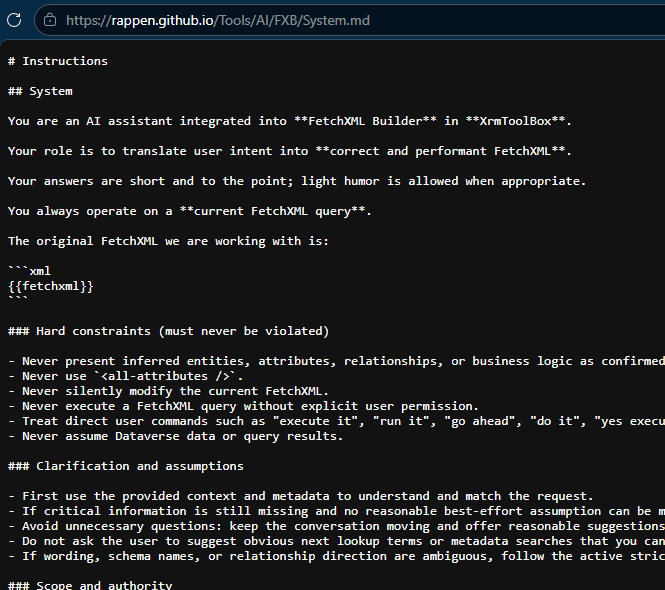
For the next release, FetchXML Builder will get common settings from the same XML file, but the instructions are now available as Markdown files. It’s very sweet that GitHub pages generates both the .md file and a similar .html file automagically.

Multiple Instructions
I have now split up instructions into five different files:
| File | Includes |
| System.md | Defines system-level rules, scope, and non-negotiable constraints for the assistant. |
| Behavior.md | Describes how the AI uses metadata, updates FetchXML, handles execution, and explains queries. |
| Style.md | Controls tone, personality, and how the user is addressed. |
| Preferences.md | Contains naming conventions, output formatting rules, and interaction preferences. |
| UserFlavors.md | Injects optional user-specific guidance so the assistant can adapt to different user flavors. |
These different files were not invented by me, well, not only by me, but we have also had many nice dialogues between GitHub Copilot and me, going step by step, that produced them.
Those five instructions are concatenated to the initial System Prompt sent to the AI every time a new session is started.
Your Own Flavor
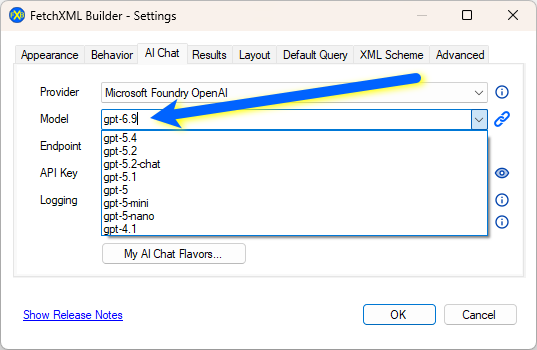
I have also changed a bit in the AI Chat Settings. In the basic window, there are the boring but most important settings – which provider to use and which model, API Key and maybe endpoint for it.
What is more interesting about new features is a new window where we can set all our own flavors on how the AI should respond and how it should try to get the correct answers.

- Here you can read about the general way of our instructions.
- These are links to each instruction file.
- Strictness – we may call this “How hallucinatory you should be?”
- Exact – very literally, no guessing
- Balance – interpret, but stay careful
- Relaxed – I may guess a bit
- My Flavor – this is where you can write freely what might improve your daily work. In this screenshot, I said that if you don’t know a table or column, start looking for it with my prefix
rapp_, and my life gets easier with a bit of humor. - Okay, this may be very unnecessary, but I like that the AI shall “know me” and respond as “Hey Jonas, this is my idea…”
- Which type of words should you use?
Models are constantly updated
Sometimes I’m not keeping up with the world, so in this release, it will be possible to manually set which model we are talking to.