To the eXtreme

eXtremeCRM

This year I will be attending my fourth eXtremeCRM Europe conference.

After joining the eXtremeCRM conference in Prague (2011), Rome (2013) and Barcelona (2014) I will join this year’s edition as well, which will be hosted in Madrid on April 20-23. Besides tons of sessions on the cutting edge of Dynamics CRM development, there are a lot of coffee breaks to be filled with other things than just cookies and coffee. Continue reading “To the eXtreme”

Introduction to FetchXML Builder

FXB-659-white
FetchXML Builder for XrmToolBox is getting more and more attention and is now downloaded and used in most parts of the world. Current numbers indicate a total download count of about 1600, and top count for a single version is close to 400. So I figured it was probably time to write an introduction to the tool, though I have actually received very few questions about how to use it (is it really that intuitive and self-explanatory??) There is now a page on this blog dedicated to FetchXML Builder with brief information on how to use the tool and what features it offers. It begins like this: Continue reading “Introduction to FetchXML Builder”

OnChange part 3: Where is the clearOnChange method?

The Microsoft Dynamics CRM SDK comes with lots of functionality to affect how CRM behaves on the client side.
In a couple of articles I will discuss the opportunities ventilate my frustration over run-time event handling manipulation.

Continue reading “OnChange part 3: Where is the clearOnChange method?”

OnChange part 2: addOnChange with context awareness

The Microsoft Dynamics CRM SDK comes with lots of functionality to affect how CRM behaves on the client side.
In a couple of articles I will discuss the opportunities ventilate my frustration over run-time event handling manipulation.

Continue reading “OnChange part 2: addOnChange with context awareness”

OnChange part 1: Remove design-time event handlers

The Microsoft Dynamics CRM SDK comes with lots of functionality to affect how CRM behaves on the client side.
In a couple of articles I will discuss the opportunities ventilate my frustration over run-time event handling manipulation.

Continue reading “OnChange part 1: Remove design-time event handlers”

FetchXML count="-1" now returns records again

Last September I highlighted a change in the FetchXML interpretation, where using syntax like…

<fetch count="-1" mapping="logical" version="1.0">
  <entity name="account">
    <attribute name="name" />
    <attribute name="address1_city" />
  </entity>
</fetch>

…would not return any records. You had to use a count of “0” instead.
Now, when running CRM 2013, a count of “-1” returns records again 🙂
Perhaps someone in the product team happened to read my post and thought they should be nice to me.
That was kind.

CRM 2011/2013 Reset Sitemap problem

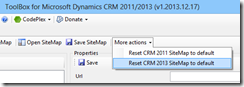
As you might have seen from previous posts on my blog, I am a big fan of the XrmToolBox by Tanguy, especially the Sitemap editor is excellent in its simplicity and capabilities. image
However, I recently ran into a problem after using the function:
Reset CRM 2013 SiteMap to default. Continue reading “CRM 2011/2013 Reset Sitemap problem”

MS CRM 2011 UR14 Breaking Change: FetchXML count="-1" does not return any records

A change in the interpretation of FetchXML “count” attribute has been identified from Update Rollup 14 for Microsoft Dynamics CRM 2011.

In many situations when you use FetchXML you have the need to return all records available, instead of using paging or in other ways limiting the number of records returned.
Up until now, we have regularly used the method of setting the count attribute to “-1” to indicate “all records”.

<fetch count="-1" mapping="logical" version="1.0">
  <entity name="account">
    <attribute name="name" />
    <attribute name="address1_city" />
  </entity>
</fetch>

This is however not a good idea if you are running CRM with UR 14. Instead, this will not return any records at all!
Setting the count attribute to “0” or completely omitting the count attribute will return all records (up to the internally set limit, typically 5000).

<fetch count="0" mapping="logical" version="1.0">
  <entity name="account">
    <attribute name="name" />
    <attribute name="address1_city" />
  </entity>
</fetch>

In the documentation of the FetchXML syntax it is not stated how to use the count attribute to instruct CRM to return all records, and maybe it is just us who ignorantly have used the “-1” value until now and just us who consider the change to be “breaking”… but somehow, I don’t really think so.

Are You a Rock Star?

rockstar The Microsoft Dynamics CRM community is constantly growing, and it does so in many directions. Now we are all (who desire to sign up for it) ranked by our individual CRM Rock Star shine! Just enter your certs, projects and inspirations and – voila! – you get your ranking in your own country and globally. rockstarJR Check my stats here http://crmrockstar.com/rappen and sign up to find out how much of a Rock Star you are!